


How to Get Started With Automated Forex Trading


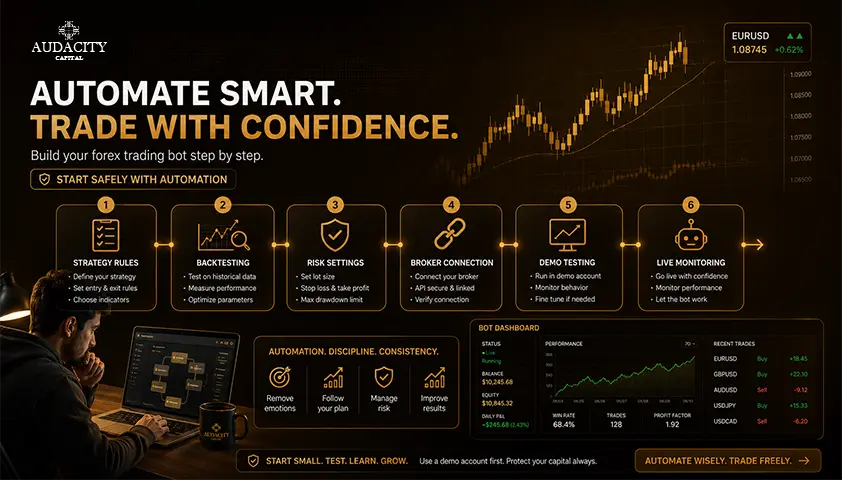
Automated Forex Trading involves the use of software designed to track the market and execute trades, manage positions, or exit when certain conditions are fulfilled.
The first thing that you will require include a rule-based strategy, a platform that is appropriate for your trading system, an execution software (the Expert Advisor), historical data, a demo account, and a plan to monitor the system.
The key point to mention here is to set your expectations right from the very beginning. Even though automation is capable of increasing efficiency and analyzing multiple markets at once, it does not necessarily generate profits.
What Automated Forex Trading Is, and What It Is Not?
Automated forex trading is about how a decision is carried out, it's not about the quality of the decision itself. Software follows rules. Nothing more.
Semi-automation doesn't go so far as the trigger: it can tag setups, determine position sizing, or even prepare orders, but the trader has to click.
Full automation analyses conditions, opens orders and manages exits without any manual confirmation.
These are both excellent models. Each requires a different degree of trust in the code and attention by the trader.
An Expert Advisor (EA) is a program that is executed in MetaTrader. A cBot works in cTrader in the same way.
API trading allows external software, usually written in Python, to directly interact with the trading provider. Each approach comes with its pros and cons and security risks.
Automation is NOT the same as AI.
A fixed forex EA that uses an if-then rule set is fully automated and has no involvement of machine learning. AI or ML is present only when a trained model is a key part of the decision making process, and that adds a new set of test challenges.
Automation is not the same as Copy Trading or signals.
Copy trading is when you copy another account. Signal-based trading gives you an exact signal as to which trades to take, and you do the execution yourself. Self-directed automation is automation that is directed by the rules that you define.
There is a unique set of transparency, control, and counterparty risk for each of these models and should not be interchangeably compared.
Turn a Manual Trading Idea Into Rules a Computer Can Execute
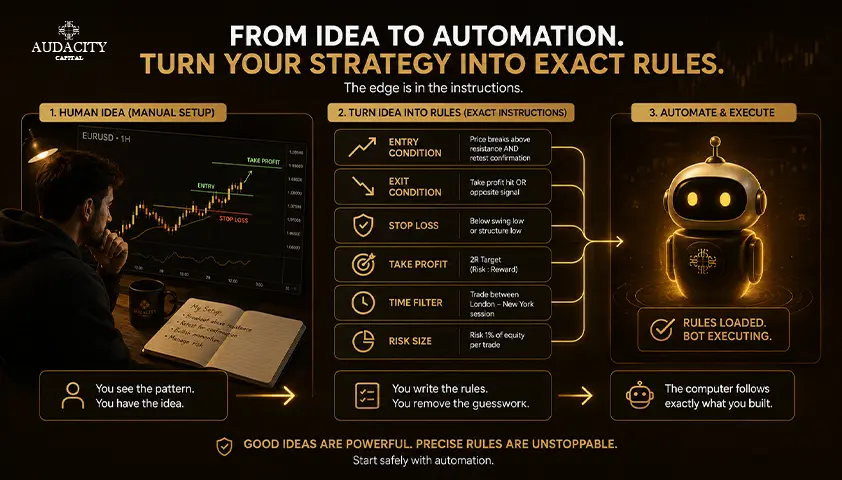
Prior to writing any code, the strategy should be objective. It’s impossible to program your computer to "buy a strong breakout" or to avoid "bad news". Every single input must be observable and every decision point must be predetermined.
1. Start with the market and timeframe.
Set the currency pair, chart time frame, trading session, and whether or not the system can hold onto overnight, on weekends or through scheduled economic releases.
2. Specify the entry with precise conditions.
Label the price level, indicator value, candle-close requirement, spread filter and any timing elements. Indicate order type (market, limit or stop) and duration for the order to remain pending before it is cancelled.
3. Describe risk and exit logic independently of the entry.
This includes position size formula, stop placement, take-profit logic, any time-based exit, trailing, maximum number of trades open and what the system does on a loss or a connection failure.
4. Carefully define no-trade conditions.
Common examples:
- Spread wider than a chosen threshold
- Insufficient free margin
- Platform disconnected from the server
- Repeat signal within a window
- Open position on the same symbol
- Session closed or a daily risk limit already reached
5. Add state and recovery rules.
The EA must be prepared for what to do following a restart. Does it know what positions are unfilled prior to the crash? How does it prevent duplicate orders? How does it synchronize with the server when it reconnects?
Choose How You Will Automate The Strategy?
Route selection is a compromise between control, skill level and the amount of verification to be done.
1. Build an EA in MQL4 or MQL5
Best suited for traders who want the strategy to execute in a MetaTrader platform and who wish to control the entry/exit logic, inputs and trading logs.
MQL4 and MQL5 provide access to the built-in order handling system and Strategy Tester on the platform. Requires coding skills or a trusted developer and you still must test all behavior yourself.
2. Apply no-code or low-code strategy builder
Best for creating an EA from simple indicators and price rules without having to write each line manually. The first version is boosted with a no code strategy builder.
The downside is that the visual blocks may mask the order-handling assumptions and may not be able to deal with complicated state, portfolio or error logic. Remember to read the exported code first before trusting it.
3. Platform-native automation environment (cBots)
Ideally, when the provider and workflow are already integrated within that platform. Having the strategy, the tester, and deployment environment all on one stack will minimize implementation differences between test and live.
4. Develop external API / Python automation
Ideal for custom data pipelines, portfolio logic, machine learning or integration with external services. API trading is the most flexible, and the most volatile in terms of failure sites: authentication, hosting, network stability, version drift all fall into your responsibility.
5. Buy or license a third-party forex robot
It is the fastest method of installation, but also the least transparent. A commercial forex trading robot might not provide information on its entry logic, lot escalation, hidden filters, or conditions for its published history.
If you cannot inspect the logic, you cannot evaluate the risk.
Copy trading is not included in this list. It puts strategy ownership completely in the hands of the provider, and mandates a different due-diligence process based on the provider, not the code.
How to Get Started With Automated Forex Trading in 7 Steps
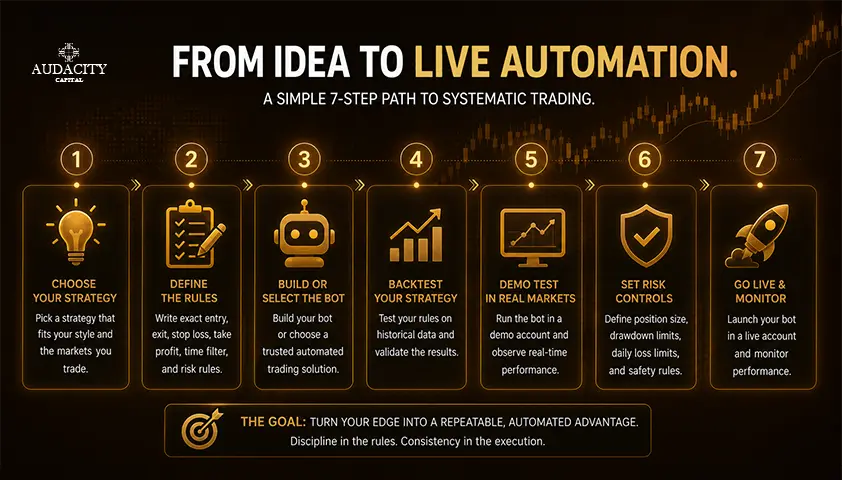
This is the sequence that separates a disciplined launch from a rushed one. Work through it in order.
Step 1: Show that the manual rules are objective
Write the full set of rules and then test them out on the historical chart by hand. If two traders using the same rules enter different trades, the logic remains subjective and is yet to be automatized. Fix the issues in the rules.
Step 2: Select a compatible provider and platform
Check whether the instrument is supported, whether it supports MT4, MT5, cTrader or API, netting or hedging, minimum trade volume, stop-distance rules, commission, swap, whether automation of trading is permitted with the given type of account. Check the regulation/legal status according to your jurisdiction.
Step 3: Construct, commission, or test the program
Map all the rules to an individual input parameter or code path. Need comments, version control, dependency list and design that allows the risk settings to be modified without disrupting the main signal logic. If you are not the coder, read the code before the program runs.
Step 4: Run a realistic historical backtest
Include all relevant data, such as spread, commission, slippage, and swap if applicable, and ensure it aligns with the target market and account. Ensure that entries are based on information that was available at that specific time, and not future bars. This is the most prevalent cause of false backtesting results.
Step 5: Challenge result outside the development sample
Execute the strategy over different time periods, on adjacent parameter sets and under various volatility scenarios. Do not accept a system that only functions with one pair, one narrow range or one exact combination of parameters, unless it is fully understood and justified.
Step 6: Forward-test on a demo account
Execute the same compiled program, provider, symbols and settings that you will use in live. Compare the actual demo fills and logs with the trade sequence that you would expect. All discrepancies must be investigated prior to putting money into the game.
Step 7: Deploy safely and monitor continuously
Begin by using small amounts. Have alerts and a documented shutdown rule from the get-go. Do not judge the system by the net profit, judge it by the trading volume, the number of rejected orders, the spread and platform uptime. Completion of all seven steps decreases unnecessary errors. It doesn't eliminate market risk, and it doesn't guarantee that the edge will remain.
How to Backtest an Automated Forex Strategy Properly?
A backtest is only useful if the test conditions resemble the conditions the system will actually face.
Instruction #1: Match the test model to the strategy.
Bar level data is acceptable to a system that only acts on the bar close. For a system with intrabar stops, pending orders or rapid re-entries, realistic tick data & spread modelling is necessary. The incorrect model can turn a losing strategy into a false winner on screen.
Instruction #2: Show all costs for the entire trade series.
Add spread, commission, slippage, swap, rejected orders and any provider specific stop/execution constraint. A tight-target system that doesn't consider costs in backtesting almost always overstates its edge.
Instruction #3: Split development from evaluation.
Optimize within an in-sample testing window. Freeze the rules. Then test them on unseen out-of-sample testing data. A re-optimization after observing the out-of-sample result is equivalent to making it development data and the honest test is gone.
Instruction #4: Test parameter stability.
A stable concept does not crumble in the face of changes in the length of the moving average, the stop multiplier, and the session boundary. An isolated peak in the optimization plot is a curve-fitting warning sign, not an insight.
Instruction #5: Use multiple market regimes.
Add trends, ranges, high and low volatility, or liquidity/volatility changes. If the platform allows, run walk-forward testing or rolling testing rather than the one static split. This demonstrates the ability of the system to adapt, in a regime change, rather than how it performed in one favorable year.
Instruction #6: Measure more than return.
Consider trade count, expectancy, maximum drawdown, profit factor, average winning and losing trade, longest losing streak, exposure, stagnation and cost sensitivity.
If available, consider Monte Carlo testing or trade order reshuffling as a stress test. It cannot foresee what will happen to the future. It demonstrates what amount of the historical result was attributable to one lucky run of trades.
What You Need to Keep a Forex Bot Running Around the Clock
EA only trades when its execution environment is running, connected and allowed to trade. When a local desktop terminal is closed, the local EA will stop when it is closed, unless the setup has been moved to an approved hosted environment.
A VPS allows that the terminal runs near the actual trading server and is up and running even if your computer is down. It also brings its own credentials, OS updates, resource restrictions and restart dangers that you need now to deal with.
The latency to the broker is more relevant to a more frequent or tight-target system than to higher time frames.
1. Implement logging and alerts for every meaningful event: All events like startup, shutdown, trade attempts, rejected orders, connection loss, spread rejection, risk-limit activation, and unexpected change in positions need to be recorded in the log that can be analyzed later on.
2. Implement duplicate-order and restart protection: Program should identify trades based on magic numbers or comments, should reconcile open trades after reconnecting, and should not fire a trade twice.
3. Have a manual kill switch at platform level and at strategy level: It is important to know how to stop one EA from trading, disable all automated trading or shut the server without losing open trades.
4. Be cautious with external permissions: MetaTrader indicates that DLL imports and WebRequests destinations can be very risky if the application or endpoint isn’t secure. Never use them by default, and never put any broker credentials into scripts that you don't know.
5. Document platform, operating system and EA version prior to update: Any minor update may impact permissions, symbols, data behavior, execution or dependencies.
Refer to the current documentation of the MetaTrader or the platform (rather than a vendor's page) for precise installation instructions.
Why Automated Forex Trading Systems Fail?
The most frequent failure is not technical. It is a strategy geared toward the past that doesn't have any long-term competitive advantage when you factor in realistic costs.
Reason #1: Market regimes change.
Trend following systems can become stagnant in trending ranges. A mean-reversion system can bleed when there is a prolonged trend. A news-sensitive system can get into trouble when there's a lack of liquidity around an event.
Reason #2: Small edges are lost in execution gaps between backtest and live trades.
Variable spreads, slippage, latency, partial fills, rejected orders, and symbol differences between demo and live are of most concern with tight-target and frequent trading strategies where each trade only needs to earn a small amount.
Reason #3: Risk logic can hide tail exposure.
Martingale, averaging down and grid trading systems tend to have smooth equity curves until one large move takes a big hit far larger than the typical win. The system was not "safe" to begin with. Its underlying risk profile was always the same.
Reason #4: Technical failures compound fast.
A duplicate-order error, a stale data feed, a mistake in lot conversion, a time-zone error or restart loop can make the same mistake numerous times without a human catching it.
Reason #5: Portfolio risk is often ignored.
There may be several EAs with a similar USD pair, that could be one consolidated currency exposure even though the charts appear to be separated.
Reason #6: Human intervention can compromise the system.
Problems can arise when traders change settings after a loss, deactivate stop-losses, switch between systems impulsively, or keep a losing bot running simply because its backtest was profitable.
Manual execution may be replaced by automation, but the system must still be designed, tested, and monitored. When its underlying assumptions are no longer valid, the system should be modified or retired.
Using Automated Forex Trading on a Funded Account
A bot allowed by a broker can still break a funded-account rule. The two rulebooks are separate, and the program's rulebook is the one that matters for the funded trader.
Before you attach any system to a funded account, verify the program's EA policy, trade-duration rule, news restrictions, maximum position size, copying policy, drawdown calculation method, and any list of prohibited strategies.
For Audacity Capital paid programs, current guidance permits EAs when they comply with the prohibited-strategy rules.
Published rules also state that only self-developed EAs are allowed. Third-party EAs, HFT, martingale or averaging down, grid trading, copy trading, and automated bulk trade execution are restricted.
Audacity Capital currently permits VPS use for compliant EA operation, provided the setup does not cause server abuse or prohibited behavior. Rules change, so verify the exact current rulebook before deployment.
Paid-program rules do not carry across to the free competition. Audacity's competition rules currently prohibit EAs, bots, and automated strategies. Treat them as separate products with separate rulebooks.
Translate the account rules into code-level controls inside the EA:
- Daily loss lock
- Total drawdown lock
- Maximum simultaneous positions
- Trade-duration check
- News-window filter
- Lot cap per symbol and total
- Duplicate-order block
- A "no new trades" state when a breach threshold is approached
Coding a limit does not transfer responsibility to the software. Open loss, slippage, overnight exposure, and rule compliance, all still remain the trader's responsibility.
Nothing here suggests that automation helps pass a challenge or secure a payout. It is a tool for consistent execution, not for consistent outcomes.
Frequently Asked Questions
Yes, through no-code strategy builders, platform-native visual tools, or licensed third-party EAs. Automated forex trading for beginners without code is realistic for simple indicator or price rules, but the trader still has to specify entry and exit logic exactly, verify the exported behavior, and test the system properly. Skipping those steps is the real risk, not the absence of coding skill.
No. A fixed-rule EA follows if-then instructions and never learns. An AI or machine-learning system uses a trained model to make part of the decision, which changes how it must be tested and monitored. Marketing often blurs the two, but the underlying method matters when you evaluate the claims.
Automation can execute a profitable rule set consistently, but it cannot guarantee that the rule set has an edge or that any past edge will continue. Profitability depends on the underlying strategy, cost structure, risk controls, and market conditions, not on the fact that the trades are automated.
MT5 is the current-generation platform with a faster strategy tester, multi-threaded optimization, and broader instrument support, which is why most new MT5 automated trading development is in MQL5. MT4 is still widely used and has a large library of older EAs written in MQL4. The right choice depends on which platform your provider offers and where your existing code or tools already live.
Not by default. An EA runs inside the terminal, and closing the terminal stops the EA. To keep it running while your machine is off, the terminal has to run on a VPS or another hosted environment that stays online and connected to the broker.
There is no universal number of days. The forward test needs enough trades to be meaningful and needs to cover varied market conditions rather than one calm week. A system that trades rarely needs a longer window than a system that trades many times per day.
Read the code, the documentation, and the reported trade history. Signs include increasing lot sizes after a loss, several unclosed trades stacking in one direction, no fixed stop-loss on individual positions, and equity curves that look almost perfectly smooth until a single large drawdown. If the vendor will not disclose the position-sizing and recovery logic, treat that as your answer.
Rules vary by firm and by program, so check the current rulebook at the source before running any bot. Some programs allow self-developed EAs while restricting third-party robots, HFT, martingale, grid, and copy trading. A broker allowing an EA does not mean the prop firm allows the same EA on the same account.

Pronto para aplicar risco disciplinado em cripto? Explore os novos instrumentos de cripto da Audacity Capital e traga sua estratégia de trading.
Saiba MaisNewsletter
Junte-se ao nosso boletim para ficar atualizado.
Junte-se à Nossa Comunidade Social

Comece Sua Jornada Hoje Com Nosso Teste Gratuito
Mostre com orgulho suas habilidades e conquistas através de certificados e obtenha reconhecimento pelo seu trabalho árduo e dedicação de potenciais investidores e colegas.
Teste GratuitoArtigos Relacionados
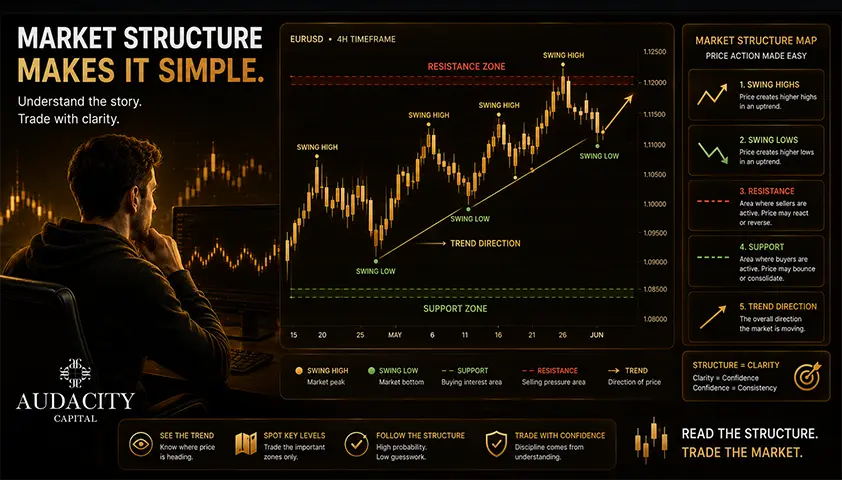
What Is Market Structure in Forex Trading?
Market structure in forex explained simply: swing highs and lows, BOS and ChoCh, support and resistance, plus how to read and trade it with discipline.


Is Forex Trading Legal in India? RBI Rules Explained
Is forex trading legal in India? Learn RBI and FEMA rules, permitted platforms, currency pairs, restrictions, and what Indian residents need to know.

Best Pairs to Trade in Forex: A Beginner's Guide to Choosing the Right Currency Pairs.
Discover the best pairs to trade in forex, including major, minor, and exotic currency pairs. Learn how to choose the right forex pairs based on your trading style and experience.
10 Best Forex Demo Accounts for 2026 : Compared & Reviewed
Find the best forex demo account for 2026. Compare platforms, virtual funds, demo duration, tools, and tips to practice trading safely.